Record your snoring. Hear it back.
You are the only person who has never heard you snore. SnoreAI records the night, finds the snoring and plays it back in the morning. No gear, no wearable, just your iPhone on the nightstand.
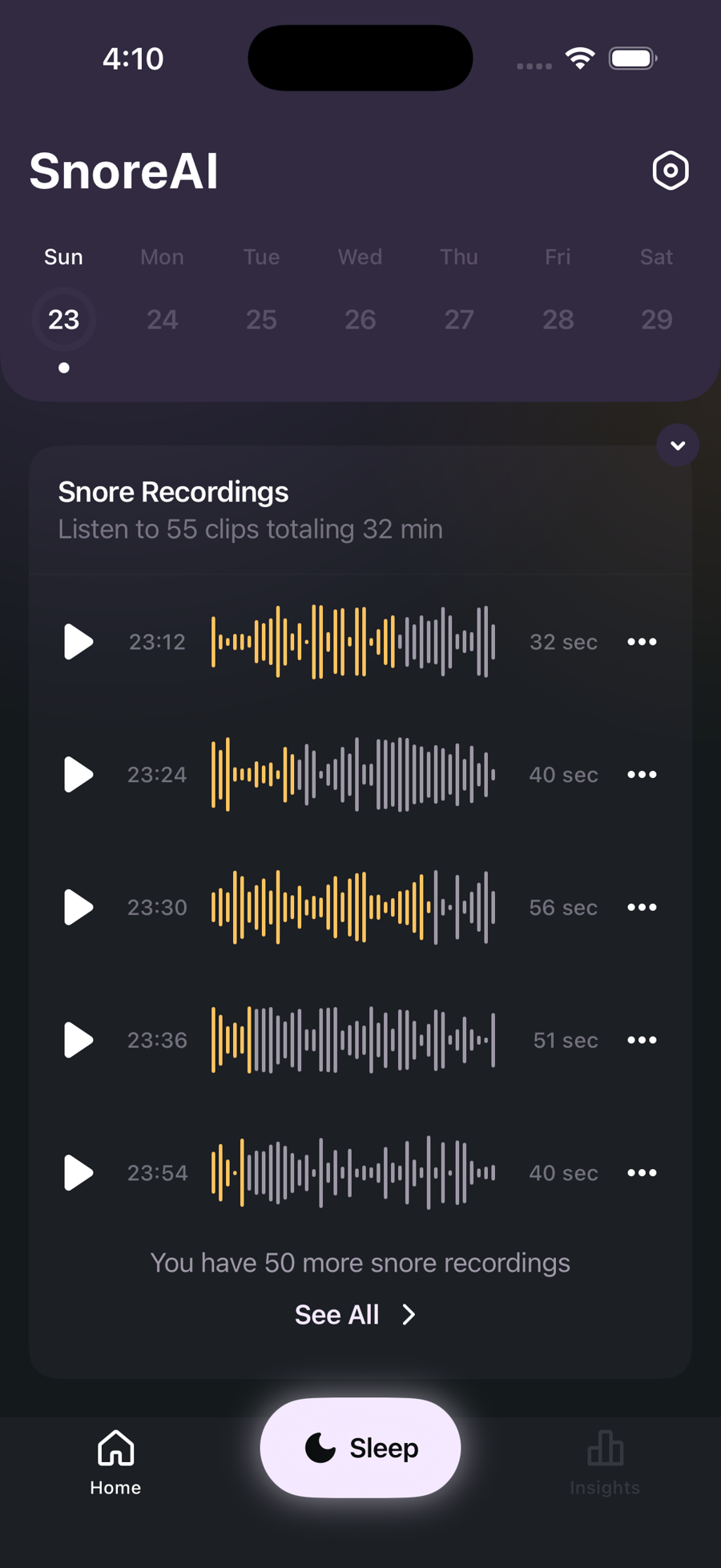
What you wake up to
Every morning the night is waiting for you: the clips, the score, and what changed.
The clips
Every snore the detector caught, with time, loudness and duration. Press play and hear yourself.
Your Snore Score
One number per night, plus snoring time and loudness, so you can see trends build over weeks.
Worse, or better
Tag your evenings: alcohol, side sleeping, a nasal strip, a humidifier. See which habits move the score.
Sleep stages
With Apple Health, snoring and sleep stages sit on one timeline. See which part of the night is loud.
Private by design
Recording and detection run on your iPhone. Your audio is never uploaded and no account is needed.
Proof for the argument
Someone says you snore. You say you don't. One of you is about to be right, and now there's a play button.
How to record your snoring tonight
It takes less than a minute to set up. The morning does the convincing.
- Get SnoreAIDownload it free from the App Store and answer a few questions about your sleep.
- Plug in, lie downPut your iPhone on the nightstand, plugged in, screen down or up, and start tracking.
- SleepDetection runs on the device all night and keeps only the moments that matter.
- Listen in the morningStop the session and open your night: clips, score, and how it compares.
Your audio never leaves your phone.
Sleep is about as private as data gets. SnoreAI records and analyses everything on the device. Nothing is uploaded, there is no account, and recording even works in airplane mode. Delete any clip whenever you want.
Questions people ask
Short answers, honestly given.
Why can't I hear my own snoring?
During deeper sleep your brain filters out familiar, rhythmic sounds, including your own snoring. That's why partners hear it clearly while the snorer sleeps through it. A recording is the simplest way to find out what your nights actually sound like.
How can I record my snoring with just an iPhone?
Put the phone on your nightstand, start a session in SnoreAI, and sleep. On-device detection listens through the night and saves clips of the snoring it finds, so in the morning you get the highlights instead of eight hours of audio.
What is a Snore Score?
A single number that summarises the night: how much you snored, how loud, and for how long. A quiet night scores high, a loud one scores low. It exists so you can compare nights and see whether a change, like sleeping on your side or skipping a late drink, actually helps.
Does SnoreAI upload my sleep audio anywhere?
No. Recording and snore detection run on your iPhone. Your audio is never uploaded to a server, there is no account, and you can delete any clip at any time. Recording works even in airplane mode.
Can it tell me what makes my snoring worse?
You tag your evenings with sleep factors, like alcohol, a late meal, dry air, side sleeping, a nasal strip or a humidifier. Over the following nights SnoreAI shows the impact of each factor on your score, so you can see what helps and what hurts.
Is SnoreAI a medical app? Can it detect sleep apnea?
No. SnoreAI is not a medical device and does not diagnose or treat any condition. If you're concerned about your breathing during sleep, take your recordings to a medical professional; many users do exactly that.
Does it work overnight without draining the battery?
It's designed to run all night with the screen dimmed. Like any all-night recording app, the best setup is a charging cable and the phone on the nightstand.
What's the best app to record snoring on an iPhone?
The right one for you is the one you'll actually leave running at night. SnoreAI is built for exactly that: no wearable, no account, no setup beyond putting the phone on the nightstand. It records the night, keeps only the snoring, gives you a nightly Snore Score, and lets you play back and share any clip. Everything is processed on the device.
Is there a free way to hear myself snore?
Yes. Download SnoreAI, record a night, and listen to the clips in the morning at no cost. A subscription unlocks the full history, deeper insights and unlimited playback, but hearing your own snoring for the first time doesn't require it.
How do I prove to my partner that I do (or don't) snore?
Record one night and play the clips back together. Each clip is timestamped with how loud and how long, and you can share any clip straight from the app. It's the fastest way to settle the "you were snoring" argument with evidence instead of opinions.
Does SnoreAI need an internet connection?
No. Recording and snore detection run entirely on your iPhone, so the core app works in airplane mode. An internet connection is only used for optional things like managing a subscription, never for your audio.
Will recording all night use a lot of storage?
SnoreAI keeps short clips of the snoring it detects, not the entire night, so a typical night is a handful of minutes of audio rather than hours. You can delete any clip at any time, and older recordings are trimmed automatically to keep space in check.
Can an app detect sleep apnea?
No consumer app, SnoreAI included, can diagnose sleep apnea. What SnoreAI can do is give you an objective record of your snoring, loudness and patterns over time, which is useful information to bring to a doctor. If you snore heavily, gasp, or stop breathing during sleep, see a medical professional.
Which iPhones does SnoreAI work on?
SnoreAI runs on iPhone with iOS 17 or later. It also works on iPad and on Mac with Apple silicon. It uses only the built-in microphone, so no extra hardware is needed.
Tonight, find out.
One night with the phone on the nightstand answers a question you've been arguing about for years.